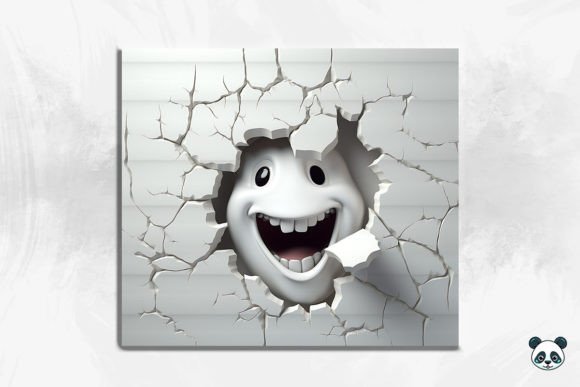
Mastering the Ghost Cracked Hole 3D Tumbler Wrap for Flawless Sublimation Results
There is a distinct thrill in pulling a freshly pressed tumbler out of the shrink wrap, only to find the design has shifted, blurred, or lost its intended depth. For creators working with spooky aesthetics and dimensional effects, the margin for error can feel incredibly small. The Ghost Cracked Hole 3D Tumbler Wrap offers a sophisticated solution for those looking to elevate their Halloween or year-round ghost-themed inventory. This isn't just a flat image; it is a complex composition designed to simulate depth, featuring watercolor textures and a "cracked hole" illusion that makes the ghost appear to be emerging from another dimension. However, possessing a high-quality digital file is only half the battle. Many entrepreneurs and hobbyists stumble not because the design lacks quality, but because they misunderstand how to prepare, size, and apply these specific types of 3D seamless patterns.
When you download an instant digital package containing a Ghost Cracked Hole 3D Tumbler Wrap Background, you are receiving a tool, not a guarantee. The file typically arrives as a high-resolution PNG, often sized around 9.3 inches by 8.2 inches at 300 DPI. While these dimensions are optimized for a standard 20 oz skinny tumbler, assuming this file will fit every cup on your shelf without adjustment is a common pitfall. Tumblers vary significantly by manufacturer. A "skinny" tumbler from one brand may have a slightly different circumference or height than another. If you skip the measuring phase and print directly, you risk ending up with unsightly white gaps at the seam or a design that gets chopped off at the rim. Always measure the exact circumference and usable height of your specific blank before resizing your artwork in your design software.
The Illusion of Depth and Printer Limitations
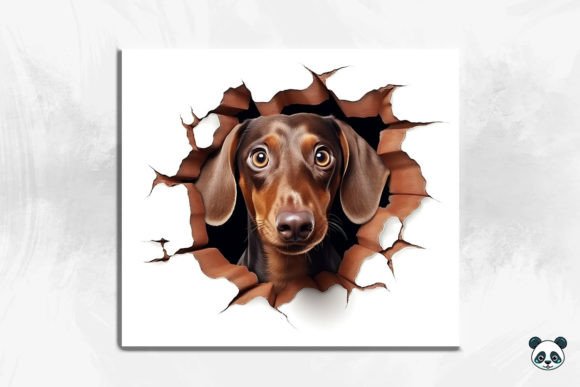
The defining feature of this design is the 3D ghost effect and the cracked hole background. These elements rely heavily on contrast and sharpness to create the illusion of depth. A frequent mistake occurs when creators use low-quality sublimation paper or incorrect printer settings, which can wash out the darker tones essential for the "hole" effect. If the blacks aren't deep enough, the ghost won't look like it is floating in a void; it will just look like a gray smudge on a white cup. To avoid this, ensure your printer profile is calibrated for dark, rich colors. You may need to adjust the saturation and contrast slightly higher than you would for a standard flat design to compensate for the ink absorption during the heat press process.
Furthermore, the nature of a seamless pattern means the edges are designed to blend together perfectly. However, if your heat press temperature is uneven or if you do not apply consistent pressure, the seam where the design meets itself can become visible, breaking the immersion of the 3D effect. This is particularly critical with background-heavy designs like the Ghost watercolor texture found in this wrap. Watercolor styles depend on soft gradients, and any banding or line marks from a poorly aligned press will be glaringly obvious. Take the time to use high-temperature tape to secure the wrap tightly, ensuring there is no slack that could cause ghosting (the unintended double image) or shifting.
Understanding File Formats and Usability
Another area where beginners often lose time and money is misunderstanding the file format included in the download. You will receive a PNG file, which is excellent for maintaining transparency and quality. However, some users attempt to edit these files in software that does not support layers or high-resolution raster graphics effectively, leading to pixelation. Remember, this item is a digital file for instant download; it does not include physical templates or vector files unless specified. If you need to add text or other elements, ensure you are working in a program that can handle 300 DPI images without downscaling them. Enlarging a raster image beyond its intended resolution will result in a blurry final product, ruining the crisp details of the Ghost 3D seamless pattern.
It is also vital to recognize that this design is specifically tailored for straight tumblers. Attempting to wrap this around a curved surface, like a wine tumbler or a mug with a handle, will distort the "cracked hole" perspective. The 3D effect relies on a flat plane to maintain its geometric integrity. Using it on the wrong substrate doesn't just look bad; it wastes a sublimation sheet and a tumbler blank. Before committing to a production run, test the design on a single blank to verify how the colors translate and how the sizing fits your specific equipment.
- Check your dimensions: Verify the circumference of your 20 oz skinny tumbler against the 9.3 x 8.2 inch provided size.
- Inspect the resolution: Ensure your design software is set to 300 DPI before printing to maintain the sharpness of the 3D elements.
- Calibrate your colors: Run a test print to ensure the dark backgrounds of the cracked hole appear deep and not washed out.
- Secure the wrap: Use heat-resistant tape to prevent movement, which is crucial for preserving the seamless nature of the pattern.
For small business owners and marketers, the appeal of the Ghost tumbler wrap lies in its versatility. It serves as a standalone product for Halloween sales but can also function as a unique, edgy aesthetic for customers who love gothic or paranormal themes year-round. By avoiding the common technical errors regarding sizing, color management, and application, you ensure that the final product matches the professional quality of the original digital art. The goal is to make the ghost look like it is truly breaking through the surface of the cup, a feat that requires precision and attention to detail.
Ultimately, success with sublimation comes down to respecting the materials and the process. The Ghost Cracked Hole 3D Tumbler Wrap provides a fantastic foundation with its intricate watercolor details and dimensional styling. When you pair this high-quality asset with careful preparation and a solid understanding of your printing environment, you transform a simple digital download into a premium physical product. Avoid the urge to rush the setup phase. Measure twice, calibrate your printer, and press with confidence. By doing so, you protect your profit margins and deliver a product that delights your customers, proving that even in the world of digital downloads, the human touch of craftsmanship remains irreplaceable.